
The simplicity of analog. The power of digital.
The simplicity of analog.
The power of digital.
The power of digital.



Get in touch with a better way to mix.
Get in touch with a better way to mix.
Legendary mixer designers Greg Mackie and Peter Watts have solved mixer problems inherent in all of our competition.
Legendary mixer designers Greg Mackie and Peter Watts have solved mixer problems inherent in all of our competition.

We’re not putting down other brands, some of whom make excellent small-format digital mixers. But their limitations begin with needing to have physical faders.
Imagine driving a car where the brake pedal is over by the glove box, the headlights are accessed from the back seat, and the stereo system volume control is under inside the glove box.
That’s the plight of old-skool physical faders. Hard 100mm faders take up a major part of the mixer’s space, attract dust and crud, wear out…and force other important displays and buttons to be remote from the faders.
You end up with much of the critical information you need while mixing being somewhere else…on LEDs somewhere above the faders, or on eensy weensy 7-inch screens. You must constantly bob back and forth between different parts of the mixer. Very possibly, you end up not seeing critical info/functions (like clipping or amount of Compression), because they’re so separated from the channel strip.
By taking away the physical faders and replacing them with a big touch screen, we focus your view and your control.


We saw the same advantages for digital mixers. The D24 and D32 are the products of that evolution.
A mixer with electronic faders?
A mixer with electronic faders?
By using the largest screens in their class, we’ve made virtual faders a practical solution.
For some, no physical faders will be a hard concept to accept. But think about it… touch screens are now a constant part of everyone’s life. In cars, in smart phones, even in the new Boeing® 777X that replaces many cockpit gauges and switches with touch screens — a Boeing spokesman explained that touch screens are intuitive, easier to train pilots with, make data selection faster and easier, and eliminate malfunction-prone physical controls.
We saw the same advantages for digital mixers. The D24 and D32 are the products of that evolution.
A mixer with electronic faders?
A mixer with electronic faders?
By using the largest screens in their class, we’ve made virtual faders a practical solution.
We saw the same advantages for digital mixers. The D24 and D32 are the products of that evolution.
A detachable stage box and 32 honest mic/line channels.
A detachable stage box and 32 honest mic/line channels.
Our D32 includes what our competitors charge extra for. Most so-called 32-channel mixers only really have 16 XLR mic/line inputs!
Pay extra to get 32 channels and a stage box. Buy a D32 and save enough to get more mics.
A detachable stage box and 32 honest mic/line channels.
Our D32 includes what our competitors charge extra for. Most so-called 32-channel mixers only really have 16 XLR mic/line inputs!
The D32 includes a 32-channel detachable stage box at no additional costs.

Look on the back of our D32 and you’ll see thirty-two Lyric mic/line inputs. No add-ons necessary.
No having to pay for a stage box. The D32 separates and lets you put the I/O up to 100 meters (325 feet) away with just a CAT 6 cable connecting them.
It’s also rack-mountable. By the way, you also get a free floor pedal that lets you switch between four Scenes, four FX Presets, or four Mute Groups.

No having to pay extra for a stage box. The D32 splits apart and lets you put the I/O up to 150 feet away from the controller with just a CAT6 cable connecting them.
It’s also rack mountable.
you also get a floor pedal that lets you switch between four Scenes, FX presets, or Mute Groups. Free.

Look on the back of our D32 and you’ll see thirty-two Lyric mic/line inputs. No add-ons necessary.
No having to pay extra for a stage box. The D32 splits apart and lets you put the I/O up to 150 feet away from the controller with just a CAT6 cable connecting them.
It’s also rack mountable.
you also get a floor pedal that lets you switch between four Scenes, FX presets, or Mute Groups. Free.
A detachable stage box and 32 honest mic/line channels.
Our D32 includes what our competitors charge extra for. Most so-called 32-channel mixers only really have 16 XLR mic/line inputs!
The D32 includes a 32-channel detachable stage box at no additional costs.
See more; access it faster.
EQ screens, for example, can occupy the whole screen so control is more precise. Extra features can be added (such as the channel strip with 10 parameters) and the Master Left/Right Output fader…because stuff happens.
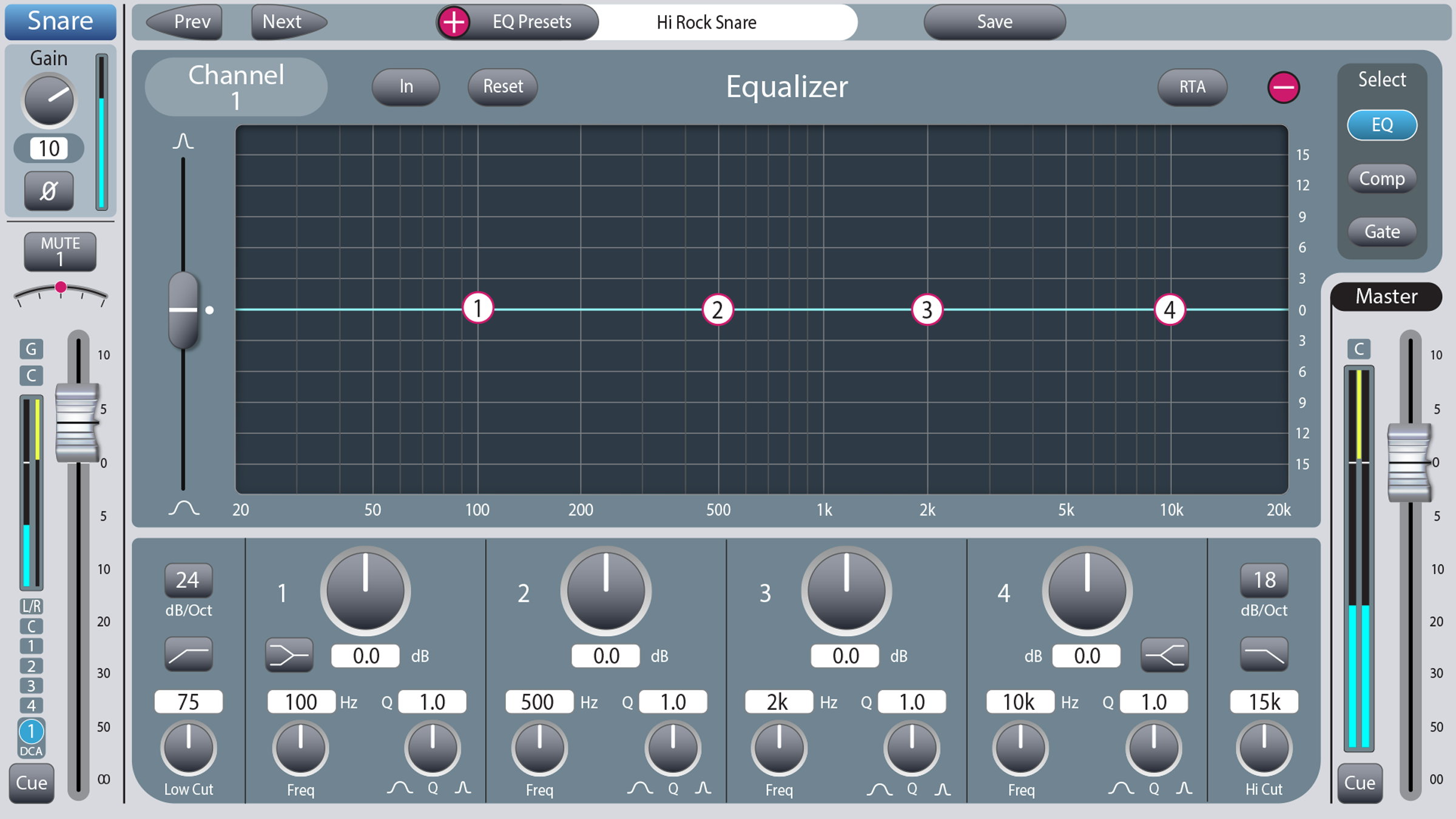

Not all of these are critical for minute-to-minute live mixing, but many affect your control of the mixer – Compression and Gating, for example.
Pristine yet robust Lyric preamps.
Peter Watts has been advancing and refining mic preamp technology for literally 50 years. Lyric is the pinnacle of his expertise.


Lyric preamps don’t vary when presented with a wide range of input impedances. Complete rejection of Radio Frequency Interference while maintaining near “DC-to-Light” frequency response. Utterly free of coloration…
We could wax even more poetic about Lyric’s accuracy, warmth and headroom, but hearing is believing.
Pristine yet robust Lyric™ preamps
Pristine yet robust Lyric preamps.
Peter Watts has been advancing and refining mic preamp technology for literally 50 years. Lyric is the pinnacle of his expertise.
When you hear a Fleetwood Mac song from the 70’s, you’re hearing the mic preamps on the Trident Di-An mixing console that Peter helped create. That was then. In the intervening years, he as been advancing the preamp state-of-the-art for many well-known companies. His reputation has only grown.
Now his genius has culminated in the Lyric™ preamp design. Instead of typical dual single-input devices, Lyric uses dual quad-matched, low-noise Class A input stages that feed fully balanced interstages into an integrated Analog to Digital converter (typically the A/D converter is a separate, outboard stage where it can pick up noise).
Lyric preamps don’t vary when presented with a wide range of input impedances. They completely reject Radio Frequency Interference while maintaining near “DC-to-Light” frequency response. Utterly free of coloration…
Pristine yet robust Lyric™ preamps
Peter Watts has been advancing and refining mic preamp technology for literally 50 years. Lyric is the pinnacle of his expertise.
When you hear a Fleetwood Mac song from the 70’s, you’re hearing the mic preamps on the Trident Di-An mixing console that Peter helped create. That was then. In the intervening years, he as been advancing the preamp state-of-the-art for many well-known companies. His reputation has only grown.
Now his genius has culminated in the Lyric™ preamp design. Instead of typical dual single-input devices, Lyric uses dual quad-matched, low-noise Class A input stages that feed fully balanced interstages into an integrated Analog to Digital converter (typically the A/D converter is a separate, outboard stage where it can pick up noise).
Lyric preamps don’t vary when presented with a wide range of input impedances. They completely reject Radio Frequency Interference while maintaining near “DC-to-Light” frequency response. Utterly free of coloration…
Signal Processing thru enhanced BigChannels.
Signal processing thru ingenious BigChannels.

Tap a channel’s “thumbnail” EQ view and you discover the BigChannel, a better signal processing system. It shows not only EQ, Gate, Compression, effects, but the channel strip and LR Main Output meter and fader.
We didn’t invent the concept of consolidating an input channel’s signal processing on a single screen. But only the D24 and D32 lead off with a parametric EQ thumbnail on every channel strip! Visible at all times, it activates the channel’s BigChannel. Sometimes you need to dig deeper. Sometimes, just seeing the accurate “thumbnail” is all you need.
First, BigChannels are BIG because of our ginormous screens that gives us the space to add features and make signal processing more intuitive. For example, Compressor/Limiter and Gate/Expander often don’t get used enough because for many operators, they’re too complex. Our screens include dynamic visual representations that make adjustment much easier than just knobs. Plus 20+ pages of instruction in our User Guide that’s built into the D24 and D32.
Second, BigChannels are big because we included Channel strip, Mute Groups, FX and Aux sends, Master L/R Output strip with Channel Delay. These important controls are visible and handy while you’re using the BigChannel and its detail screens. — And you can move back and forth to the next channel without exiting BigChannel. Naturally, everything is touch-sensitive for fast tweaks, or delicate changes via the Rotary Controller.
BigChannels are BIG because of our Ginormous screens that gives us the space to add features and make signal processing more intuitive. For example, Compressor/Limiter and Gate/Expander screens include dynamic visual representations that make adjustment much easier than just knobs.
BigChannels are also big because of what we included on left and right side: Channel strip, Mute Groups, FX and Aux sends, Master L/R Output strip with Channel Delay. These important controls are visible and handy while you’re using the BigChannel and its break-out screens.
We didn’t invent the concept of consolidating an input channel’s signal processing on a single screen. But only the D24 and D32 lead off with a parametric EQ thumbnail on every channel strip! Visible at all times, it activates the channel’s BigChannel. Sometimes you need to dig deeper. Sometimes, just seeing the accurate “thumbnail” is all you need.
First, BigChannels are BIG because of our ginormous screens that gives us the space to add features and make signal processing more intuitive. For example, Compressor/Limiter and Gate/Expander often don’t get used enough because for many operators, they’re too complex. Our screens include dynamic visual representations that make adjustment much easier than just knobs. Plus 20+ pages of instruction in our User Guide that’s built into the D24 and D32.
Second, BigChannels are big because we included Channel strip, Mute Groups, FX and Aux sends, Master L/R Output strip with Channel Delay. These important controls are visible and handy while you’re using the BigChannel and its detail screens. — And you can move back and forth to the next channel without exiting BigChannel. Naturally, everything is touch-sensitive for fast tweaks, or delicate changes via the Rotary Controller.
Signal processing thru ingenious BigChannels.

There are times when a mixer has lighter duty: A business presentation, a Wednesday church service, an acoustic combo, a podcast, a school rally, a courtroom.
And sometimes the D24 or D32 must be operated by someone with only a basic knowledge of mixing.
The ten Simple Mode channels hide a lot of functions that inexperienced users may find confusing. But click on the blue EQ “thumbnail” and Simple BigChannel opens. There’s four bands of Equalization (tone controls), rotary Pan (Balance) control, simplified Compression control, preset Low Cut to remove rumble, FX Send, and Monitor send.
10-channel Simple Mode welcomes volunteers, newbies, and small events.
10-channel Simple Mode welcomes
volunteers and newbies.
Simple Mode is designed to make mixing super-easy for anyone. It’s a 10-channel “overlay” for basic mixing, new volunteers, AV operators, etc.
Everything you need to mix without the complications.

There are times when a mixer has lighter duty: A business presentation, a Wednesday church service, an acoustic combo, a podcast, a school rally, a courtroom. And sometimes the D24 or D32 must be operated by someone with only a basic knowledge of mixing (or none at all!).
The ten Simple Mode channels hide a lot of functions that inexperienced users may find confusing but includes the important basics. And it lets you “drill down” to get more sophisticated signal processing and other function. But click on the blue EQ “thumbnail” and Simple BigChannel opens. There’s There are four bands of Equalization (Tone control), rotary Pan (Balance) control, simplified “one knob” Compression control, preset Low Cut to remove rumble, FX Send, and Monitor send.
10-channel Simple Mode welcomes volunteers, newbies, and small events.
Simple Mode is designed to make mixing super-easy for anyone. It’s a 10-channel “overlay” for basic mixing, new volunteers, AV operators, etc.
Everything you need to mix without the complications.
The ten Simple Mode channels hide a lot of functions that inexperienced users may find confusing but includes the important basics. And it lets you “drill down” to get more sophisticated signal processing and other function. But click on the blue EQ “thumbnail” and Simple BigChannel opens. There’s There are four bands of Equalization (Tone control), rotary Pan (Balance) control, simplified “one knob” Compression control, preset Low Cut to remove rumble, FX Send, and Monitor send.
“Hard” buttons where you need them.
You can do almost everything on our virtual screens. That’s why there are function buttons on each side of the screen.

On the left and right of the generous D24 and D32 screens, are real physical buttons for functions that you want to get to quickly. “Hard buttons” display Mono Aux send, Stereo Aux sends, FX (Effects such as Chorus, Reverb, etc.), Equalization, Fader Mix (our much-improved version of Matrix Mix), and access to an Overview screen that shows you every fader on the mixer, an invaluable feature simply not possible with a hard-fader mixer.
The right side gives you a Home button(back to Chs. 1-12 / 1-16 or 13-24 / 17-32), Menu view (takes you back to the Manual, Simple/Standard mode select, presets, phantom power control, Anti-Feedback button, Effects Mute, and Mute and Scene view buttons. )
Down by the big, detented, Rotary Input control are multi-function Left-Center-Right buttons, and finally Monitor (routes Main L/R to speakers or headphones), USB 2-track Record (one-touch stereo recording), and Multitrack access (24-track recording via USB-C to DAW or hard disk).
“Hard” buttons where you need them.
You can do almost everything on our virtual screens. That’s why there are function buttons on each side of the screen.

The right side gives you a Home button, Menu view, phantom power control, Anti-Feedback button, Effects Mute, and Mute and Scene view buttons. Next are multi-function Left-Center-Right buttons, a big silky detented rotary control, and finally Monitor, USB 2-track Record, and Multitrack access.
On the left and right of the generous D24 and D32 screens, are real physical buttons for functions that you want to get to quickly. “Hard buttons” display Mono Aux send, Stereo Aux sends, FX (Effects such as Chorus, Reverb, etc.), Equalization, Fader Mix (our much-improved version of Matrix Mix), and access to an Overview screen that shows you every fader on the mixer, an invaluable feature simply not possible with a hard-fader mixer.
The right side gives you a Home button(back to Chs. 1-12 / 1-16 or 13-24 / 17-32), Menu view (takes you back to the Manual, Simple/Standard mode select, presets, phantom power control, Anti-Feedback button, Effects Mute, and Mute and Scene view buttons. )
Down by the big, detented, Rotary Input control are multi-function Left-Center-Right buttons, and finally Monitor (routes Main L/R to speakers or headphones), USB 2-track Record (one-touch stereo recording), and Multitrack access (24-track recording via USB-C to DAW or hard disk).
“Hard” buttons where you need them.
You can do almost everything on our virtual screens. That’s why there are function buttons on each side of the screen.
“Hard” buttons where you need them.
You can do almost everything on our virtual screens. That’s why there are function buttons on each side of the screen.

Heck, we even tossed in a 2-meter connecting cable.
Get in touch with a FREE 12-function foot pedal.
Get in touch with a FREE 12-function foot pedal.
Whether on stage or Front of House, being able to call up four Scenes, four Effects presets, or four Mute Group settings is ginormously helpful.
Whether on stage or Front of House, being able to call up four Scenes, four Effects presets, or four Mute Group settings is mega helpful.
The P1 pedal comes free with your D24 or D32. Free. It’s part of the philosophy of M&W to reward our buyers with real value. Few other mixer makers offer one and they’re always extra cost.
We can’t imagine a situation where being able to change EQ/Effects, Scenes, or selecting what channels are muted isn’t a valuable creative tool. Heck, we even tossed in a 2-meter CAT6 connecting cable.
Get in touch with a FREE 12-function foot pedal.
Whether on stage or Front of House, being able to call up four Scenes, four Effects presets, or four Mute Group settings is ginormously helpful.

Whether on stage or Front of House, being able to call up four Scenes, four Effects presets, or four Mute Group settings is mega helpful.
The P1 pedal comes free with your D24 or D32. Free. It’s part of the philosophy of M&W to reward our buyers with real value. Few other mixer makers offer one and they’re always extra cost.
We can’t imagine a situation where being able to change EQ/Effects, Scenes, or selecting what channels are muted isn’t a valuable creative tool.
Heck, we even tossed in a 2-meter CAT6 connecting cable.